
Discord has carved out a niche as a versatile platform, catering to both gaming communities and professional teams. With its array of features—text, voice, video chats, and streaming capabilities—Discord enhances communication and collaboration seamlessly. However, its specific functionalities or aesthetics may not appeal to everyone. If you find Discord isn’t quite the fit for you and your group, worry not! Here’s a roundup of some of the best alternatives out there that suit various needs and preferences.
Best Discord Alternatives to Level Up Your Communication
When hunting for the perfect Discord alternative, consider key factors like user interface familiarity, file-sharing ease, and security features. Here’s a comprehensive list of some of the best alternatives you might want to explore.
1. Slack – Best Overall Discord Alternative

If your use of Discord leans more toward professional communication, Slack might be your ideal alternative. Its clean and simple user interface makes it welcoming to new users, even though it lacks the “gamery” aesthetics found in Discord. Slack is tailored for productivity, featuring functionalities like huddles for voice chat and seamless integration with various third-party apps, making it an excellent option for improving teamwork.
| Pros | Cons |
|---|---|
| End-to-end encryption | Laggy voice chat and screen sharing |
| Clean UI | Not very gamery |
| Geared toward professionals | |
| Bots and third-party app integrations | |
| A generous file transfer limit |
Availability: Windows, macOS, Linux, Android, iOS
Price: Free with limited functionality; paid plans start at $2.67 per month
2. Mattermost – Best Discord Alternative for Professionals

Mattermost positions itself as an open-source and self-hostable messaging platform, making it an excellent contender for professionals. With features similar to Slack, it also provides boards to help teams track goals and objectives. While not primarily aimed at gamers, its calling and screen-sharing capabilities cater well to small gaming groups looking for a more structured environment.
| Pros | Cons |
|---|---|
| Store messages data locally; much secure | Not very customizable |
| Clean UI | File sharing limited to 100 MB |
| Geared toward professionals |
Availability: Windows, macOS, Linux, Android, iOS
Price: Free; paid plans start at $10 per user/month
3. Microsoft Teams – Best Alternative for Large-size Organizations

Microsoft Teams is a powerful tool designed for larger organizations but can also serve gaming teams looking for real-time collaboration. It supports both voice and video calls and allows file transfers up to 100GB, dwarfing Discord’s limit. While it’s less suited for community-building since it lacks public or private channels, it’s a solid option for those focused on group interaction.
| Pros | Cons |
|---|---|
| Clean UI | More suited for professional use |
| Easy to use | No Discord channel alternatives |
| 100GB File Sharing limit | |
| Clear calls and screen sharing | |
| Third-party app integrations |
Availability: Windows, macOS, Linux, Android, iOS, Web
Price: Free; paid plans start at $5 per month
4. Guilded – Discord Alternative with Best Feature Set
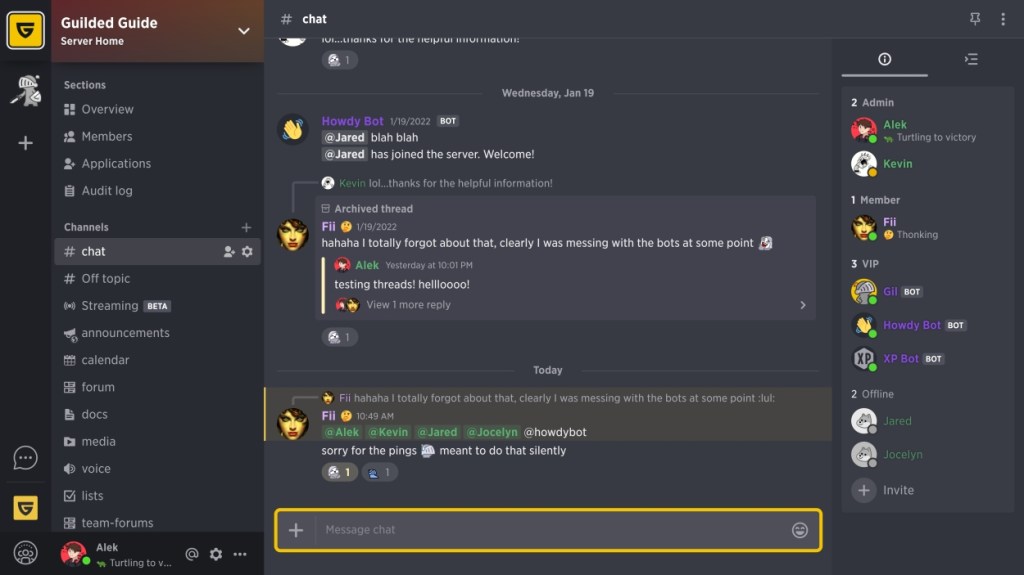
Guilded shares several similarities with Discord, making it a breeze to transition for Discord users. The interface is user-friendly, providing categories and channels along with a roles panel. What sets Guilded apart are its additional functionalities, such as calendar integration and customizable server groups, catering well to people needing more than just basic community features.
| Pros | Cons |
|---|---|
| No learning curve when switching from Discord | Settings lack key toggles and accessibility features |
| Better sorting and filtering options | Limited monetization options |
| Has publicly discoverable servers | |
| Server groups to manage multiple categories and channels |
Availability: Windows, Mac, iOS, Android, Linux
Price: Completely free
5. Telegram – Best Discord Alternative for Messaging

Often considered a WhatsApp rival, Telegram does much more. It hosts a range of community features—both public and private channels, plus a wealth of customization options. Its strength lies in messaging, with features like end-to-end encryption, group video calling, and an array of bots designed for managing and automating tasks within groups. It’s a compelling choice for those who prioritize privacy.
| Pros | Cons |
|---|---|
| End-to-end encrypted | Some features are locked behind a subscription |
| Great customization features | |
| Lots of bots | |
| Tons of other features | |
| Public and Private channels |
Availability: Windows, macOS, Linux, Android, iOS, Web
Price: Free
6. Pumble

Pumble is an appealing alternative that mimics Discord’s functionalities while sporting a cleaner interface akin to Slack. It offers real-time messaging, file sharing, video conferencing, and benefits such as unlimited chat history and the ability to add as many users as you want for free—making it an excellent choice for teams.
| Pros | Cons |
|---|---|
| Unlimited chat history | Integration options are restricted |
| Can add any number of users for free | Lacks task management features |
| Customize specific channels with themes | |
| Collaboration features |
Availability: Windows, Mac, iOS, Android, Linux, Web
Price: Free; Pro starts at $2.49 per member per month
7. Troop Messenger – Cheapest Paid Discord Alternative

Troop Messenger may lack a free plan for long-term use but stands as one of the more economical options at just $2.50 per month per user after a complimentary seven-day trial. Its feature set focuses on team collaboration, with a minimalistic dashboard providing easy access to chats, video calls, and remote sharing options.
| Pros | Cons |
|---|---|
| Unlimited chats and video calls | No free plan for long-term use |
| Rich feature set | Has a learning curve |
| Privacy-focused messaging | |
| Advanced filters and unlimited search history | |
| Built-in image editor |
Availability: Windows, Mac, Linux, Android, iOS, Web
Price: 7-day free trial; premium starts at $2.5 peruser-html”>{‘user_name’ : ‘guest’,’outbound_request’ : ‘No’, ‘finished’ : ‘End’} per user per month, with enterprise options available.
8. Rocket.Chat – Best Open Source Discord Alternative

For those seeking an open-source solution, Rocket.Chat offers a similar feel to Discord, designed for flexibility and security. The free plan accommodates up to 50 users and provides unlimited access to app integrations, direct messages, and file history. It also emphasizes privacy, granting users control over their data, and supports bridges to both Slack and MS Teams for versatile communication capabilities.
| Pros | Cons |
|---|---|
| Open source and privacy-focused | Not as feature-rich as other alternatives |
| Supports Slack and MS Teams bridges | Setting up may take longer |
| Omnichannel and federated channels | |
| Unlimited file history and app integrations | |
| Decent benefits for free users |
Availability: Windows, Mac, Linux, Android, iOS
Price: Free; Pro starts at $4 per user per month
9. Skype – Good Pick for Video Calls

Though not a direct match, Skype can still be a handy tool if you need basic group communication and video calling functionality. It allows for group calls and screen sharing but lacks many advanced features that Discord offers. While it’s user-friendly for beginners, be cautious as it can consume considerable system resources, which might affect your gaming experience.
| Pros | Cons |
|---|---|
| Clean UI | Lacks advanced features |
| Easy to use | High system resource usage |
| Generous file-sharing limit | More suited for personal and professional use |
| Clear calls and file sharing |
Availability: Windows, macOS, Android, iOS, and Linux
Price: Free
10. Element – Discord Alternative with Best Security
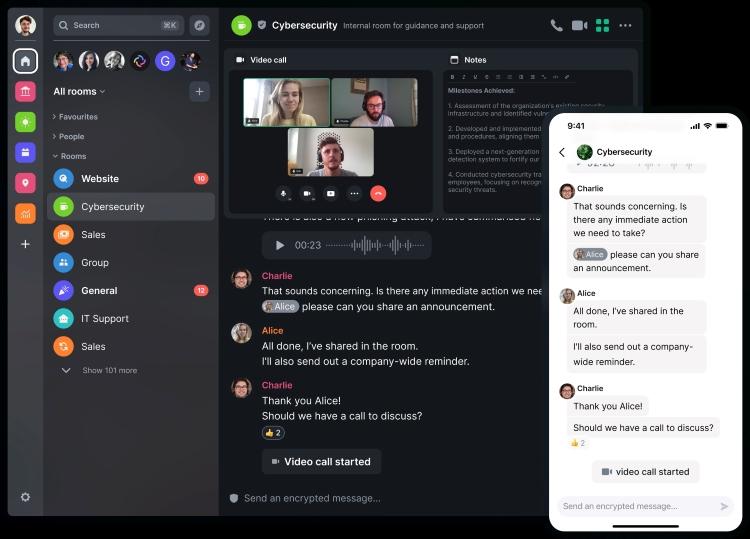
For those concerned about privacy and security, Element is a standout choice. It employs end-to-end encryption and operates on the Matrix protocol, enabling decentralized communication. While it may not cater primarily to gamers, it offers robust features for group messaging, file sharing, and voice/video calls, making it versatile enough for various uses.
| Pros | Cons |
|---|---|
| End-to-end encryption | Not very “gamery” in its design |
| User-friendly interface | Onboarding might be complex for newcomers |
| Decentralized communication options | |
| Supports voice and video calls | |
| No file transfer limit |
Availability: Windows, macOS, Linux, Android, iOS, Web
Price: Free; Pro plan starts at $2 per month
The alternatives mentioned in this article reflect the diversity of communication needs among users, from casual gamers to professional teams needing robust collaboration tools. Each option provides unique features that cater to different priorities, whether that’s security, ease of use, or advanced functionalities. Feel free to explore these platforms to find the one that best serves your needs!