
All things considered, we think Microsoft Edge is superior to Google Chrome. While both browsers are fine for everyday use, Edge utilizes all the best components that a Chromium-based browser can offer—especially when it comes to resource management. Edge also provides a slightly better privacy experience than Chrome. While Chrome may receive its updates faster, Edge isn’t too far behind.
While you don’t have to be loyal to a browser, you probably use the same one every day. And two of the most popular are Chrome and Edge, especially among Windows users. Read on for a detailed look at how we came to our conclusion!
Chrome vs. Chromium: What’s the difference?
Both Chrome and Edge are built on Chromium, a free and open-source backbone created by Google. It’s a codebase that serves as a foundation for various browsers, like Brave, Opera, and Vivaldi, each adding its unique features to the mix.
Google Chrome, developed by Google, offers numerous features and boasts an extensive library of browser extensions. Fortunately, Chromium-based browsers like Edge can also utilize many of these Chrome extensions.
Originally, Edge was built on EdgeHTML, Microsoft’s proprietary engine. However, after its shift to a Chromium-based model in January 2020, Edge has seen improved performance and a wider array of extensions. This transition was driven in part by EdgeHTML’s past struggles with speed and a lack of available extensions.
Google Chrome vs. Microsoft Edge: Quick facts
| Google Chrome | Microsoft Edge | |
| Released | 2008 | 2015 |
| Developer | Microsoft | |
| Engines | Blink, WebKit | Blink, WebKit |
| Default search | Bing | |
| License | Proprietary, but based on open-source components (Chromium) | Proprietary, but based on open-source components (Chromium) |
| Platforms | Windows, macOS, Linux, Android, iOS, and Chrome OS | Windows, macOS, Linux, Android, iOS, and included with Xbox One and Series X/S |
| Ad blocker | Not by default | Not by default |
| Private browsing | Incognito Mode | InPrivate |
| Password manager | Yes | Yes |
| Extensions | Yes—190,000+ extensions available on the Chrome Web Store | Yes—add-ons available on the Edge Add-on store, plus compatibility with all Google Chrome extensions |
Chrome vs. Edge: Feature comparison
User interface
Upon first glance, the user interfaces of both Chrome and Edge appear fairly similar. A standout feature in Edge is its ability to manage tabs vertically, which can be beneficial for those with numerous open tabs. Additionally, both browsers allow users to group tabs, helping to keep things organized.
Another interesting feature in Edge is the “Collections” function, which can help users aggregate tabs by theme—ideal for organizing holiday planning or shopping lists. The bookmarks function is termed “favorites bar” in Edge, but it operates similarly across both browsers.
Winner: Tie! There’s not enough differentiation to declare one better than the other.
Browser extensions
Google Chrome’s vast selection of extensions remains a primary advantage, boasting over 130,000 options on the Chrome Web Store. Fortunately, all of these extensions are compatible with Chromium-based browsers, including Edge.
While Edge has its own add-on store, the offerings do not stray far from those available on Chrome. Importantly, Edge users can install Chrome extensions but not the other way around.
Winner: Tie! Edge users can benefit from Chrome’s extensive library of extensions.
Customization
Both browsers offer a range of customization options. By default, Chrome has a broader variety of themes available. Like extensions, any themes available for Chrome can also be used in Edge.
Winner: Chrome takes the lead in this aspect.
Backup and synchronization
Both browsers excel when it comes to backup and synchronization. Users can synchronize:
- Bookmarks/favorites
- Extensions/add-ons
- Settings
- History
- Open tabs/tab groups
- Themes/appearance
- Passwords
Winner: Tie! Both browsers provide similar features in this area.
Compatibility and availability
Google Chrome is accessible on: Windows, macOS, Linux, Android, iOS, and Chrome OS.
Microsoft Edge also covers Windows, macOS, Linux, Android, and iOS, with added compatibility for Xbox One and Series X/S.
Winner: Tie! Both browsers are available across multiple popular devices.
Chrome vs. Edge: Performance comparison
Speed
Both browsers advertise themselves as fast, and user tests have shown minimal differences in loading times. Speed tests using the WebPST 4 benchmark demonstrated negligible variations in performance.
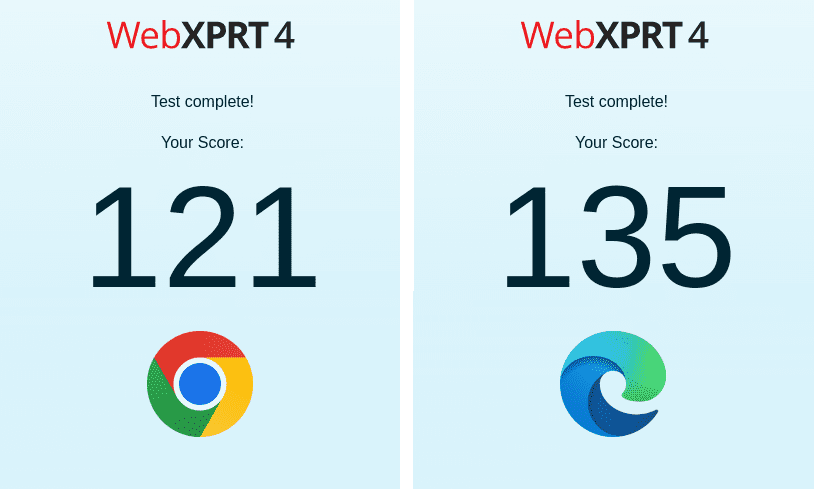
Winner: Tie! Performance is essentially comparable in this category.
Resource and RAM usage
Here’s where the comparison begins to diverge. Google Chrome is frequently criticized for being a high resource user, often portrayed as a “memory hog.” This can be exacerbated by numerous extensions, excessive tabs, or even malware.
Microsoft Edge, on the other hand, has made strides in memory management, introducing features like “sleeping tabs” to conserve resources by putting inactive tabs to sleep. Users may notice less battery drain when using Edge compared to Chrome.
While Google has attempted to improve its RAM consumption, our experience indicates that Chrome tends to be less efficient.
Winner: Edge takes the… edge… in this department.
Privacy and security
Privacy and security are critical topics in today’s web landscape. Both Chrome and Edge have developed a range of security features, including default HTTPS connections, site detection, and malware protection.
While both browsers provide decent privacy controls, Edge stands out for its user-friendly navigation and greater control over privacy settings. However, Chrome’s consistent updates help patch vulnerabilities more rapidly.
Both also offer private browsing modes—Chrome with Incognito Mode and Edge with InPrivate Browsing—but neither option is foolproof. Google, in particular, has been scrutinized for the anonymity levels of its browsing mode.
Winner: For privacy? Edge. For security? Chrome.
Chrome vs. Edge: Which is better?
Your choice ultimately depends on your priorities. Both browsers excel at everyday use. Edge optimizes resource management and privacy slightly better, whereas Chrome has faster update cycles. In the current landscape, Edge has the edge, albeit by a narrow margin.
Bonus round: Offline games comparison!
Chrome’s Dinosaur Game

The Dinosaur Game is a well-known offline feature in Chrome, activated when you lose internet connectivity. Players control a T-Rex across a pixelated landscape, dodging obstacles.
Though designed for offline play, the game can also be accessed by typing chrome://dino in your address bar.
Edge’s Surf

Edge offers a similar feature known as Surf, reminiscent of the classic SkiFree game. Users guide a character down a mountainside, avoiding obstacles and even a kraken.
Like Chrome’s game, you can access Surf at any time by entering edge://surf in the address bar.
Winner? Tie! Both games serve as enjoyable distractions during internet interruptions.
Read more: Ranked: Best (and worst) browsers for privacy in 2022