
Everything You Need to Know About Stremio in 2025
In this post, I’ll share everything you need to know about Stremio, including how it works, its safety and legality, installation steps for any device, the best Stremio add-ons, and troubleshooting common issues. I’ll also briefly compare Stremio with Kodi to help you determine if it’s still worth it in 2025.
What is Stremio?
Stremio is a popular media streaming software that allows you to stream online content on any compatible device. It lets you add special plugins, called addons, which scrape the internet for content links to movies, TV shows, live TV, anime, documentaries, music videos, and adult content.
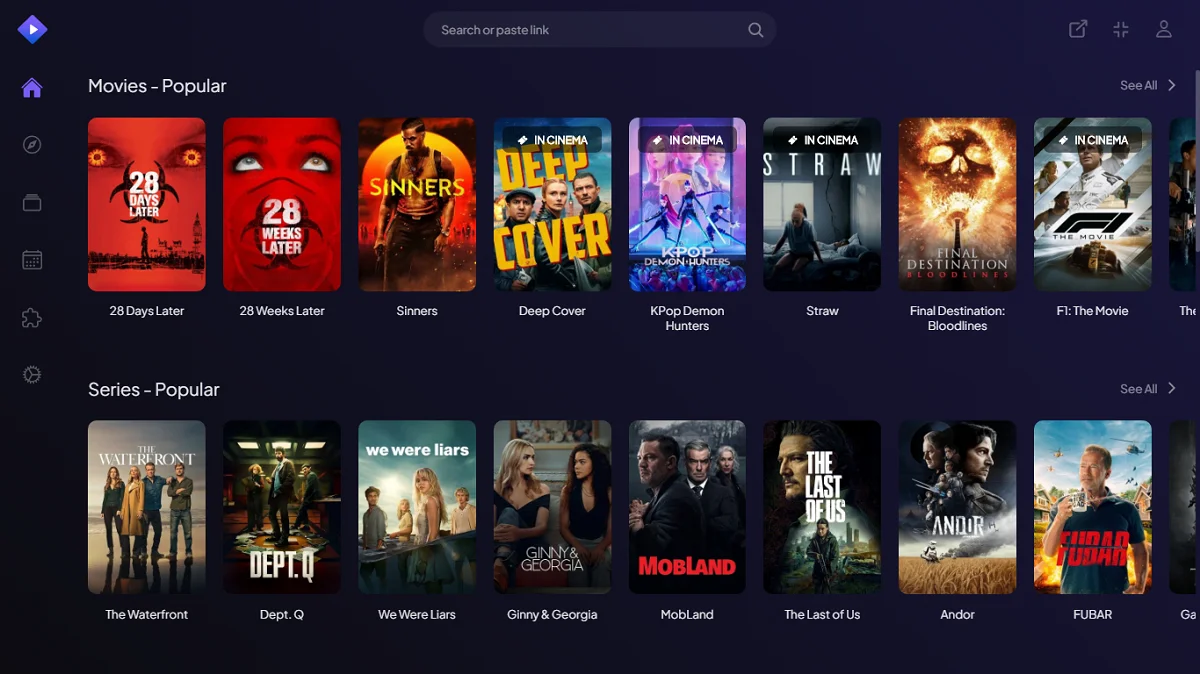
Stremio offers dedicated apps for various platforms, including Windows, Android, macOS, Linux, Android TV, Amazon Fire TV Stick, and select smart TVs. You can also access Stremio in a browser, and while there is an iOS app, its functionality is limited.
Key Features
- Add-on-based streaming
- Cloud-synced library management
- Multi-device compatibility allows syncing your media collection across devices
- Integration with popular video sources like Prime Video, Netflix, and YouTube
- An inbuilt media player supporting most video formats, including 4K HDR
- Security and privacy guarantees for users
- Free and open-source software
How Does Stremio Work?
Stremio does not host any content; it relies on addons to fetch content from the internet. Here’s how it works…
- Install Stremio
- Install a Stremio addon
- Stream content
Stremio addons are plugins that pull content from platforms like YouTube, public domain movie sites, and free-to-air TV channels. They fall into two categories:
- Official addons – Safe, legal, and maintained by Stremio.
- Community addons – Created by third parties, offering a wider range of content; legality may vary.
Is Stremio Legal and Safe to Use?
- Safety: Safe when downloaded from the official website.
- Legality: Legal when used with official addons.
I tested Stremio’s APK file (downloaded from the official website) on Virus Total, and none of the 65 security vendors flagged the file as malicious.
Last Checked: July 9, 2025

While Stremio itself is legal, the flexibility to install community or third-party addons may lead you to content of questionable legality. To ensure your safety and privacy, it’s advisable to use a VPN with Stremio.
How to Install Stremio on Different Devices
Stremio is available on official mobile app stores for Android and iOS. For all other devices, you can download it from the official website stremio.com/downloads.
How to Install Stremio on Mobile (Android and iOS)
- Open the app store and type “Stremio” in the search bar.
- Select Stremio from the suggested results.
- Click Install.
- Wait for the app to install.
- Click Enable and then Open to launch the app.
How to Install Stremio on Desktop (Windows, Mac, Linux)
- Open your web browser and navigate to stremio.com/downloads.
- Click Downloads.
- Navigate to the version for your device (e.g., Windows) and click the download link.
- Run the Stremio installer file from your downloads.
- Follow the on-screen steps to complete the installation.
How to Install Stremio on Android TV/FireStick
Stremio can be sideloaded on FireStick or Android TV using the app called Downloader.
- Navigate to the Google Play Store/Amazon App Store and search for Downloader.
- Download the app.
- Change device settings to allow installation from unknown sources.
- Launch the Downloader app and go to the URL field.
- Type the following URL: stremio.com/downloads and click Go.
- Click on Downloads and select the Android TV version to download the APK.
- Wait for the APK to download and click Install when prompted.
Best Stremio Addons in 2025
1. Torrentio
A community addon that pulls streaming links from torrent sites, allowing you to stream movies, TV shows, and documentaries. It offers free streaming links, with the option to improve video quality using Real Debrid.
2. YouTube
This official and legal addon allows you to watch YouTube videos without needing to sign in with a Google account.
3. USA TV
A third-party addon for streaming live TV online by scraping free streaming links from IPTV sources, providing access to up to 100 channels from the US.
4. The Pirate Bay+
This torrent-based addon pulls free VOD streaming links from The Pirate Bay website, though the performance can be hit or miss.
5. Anime Kitsu
An addon dedicated to anime streaming, pulling links from sources like GogoAnime to provide a variety of content, including originals and dubbed videos.
Stremio vs. Kodi: Which One Should You Use?
Stremio and Kodi are often compared, but they cater to different user needs. Both are free and open-source media centers and predominantly rely on addons for content.
Comparison Highlights:
- Installation: Stremio is more straightforward than Kodi, which often requires multiple steps for setup.
- Content Sources: While Kodi supports local files and a more extensive array of third-party addons, Stremio mainly focuses on online streaming.
- User Interface: Stremio’s interface is more user-friendly and allows for quick syncing across devices.
- Customization: Kodi provides more customization options for advanced users.
Ultimately, if you seek a simple user interface and fast content discovery, Stremio shines, whereas Kodi excels in personalization and extensive addon options.
| Feature | Kodi | Stremio |
|---|---|---|
| Installation | Moderate complexity | Quick and straightforward |
| Content Sources | Local files and third-party addons | Primarily online streaming |
| Addon Ecosystem | Large and community-driven | Smaller, focused on streaming |
| Interface | Customizable but complex | Simple and user-friendly |
| Library Management | Excellent for organizing local media | Cloud-synced watchlists |
| Customization | Highly customizable | Minimal options |
Using a VPN with Stremio
Using a VPN is highly recommended while streaming through Stremio, especially when utilizing third-party addons. A reliable VPN will protect your privacy by hiding your IP address and encrypting your internet traffic.
We recommend ExpressVPN, known for its speed and robust encryption.
 Pro tip: Turn on ExpressVPN before streaming from community addons in Stremio.
Troubleshooting Common Stremio Issues
Addons Not Working
If addons are malfunctioning, solutions include:
- Confirm the addon is functioning for others
- Restart the Stremio application
- Uninstall and reinstall the addon
- Check your internet connection
- Clear cache
- Use a VPN to tackle geo-restriction
No Streams Available
Common reasons include the unavailability of content or temporarily down servers. Solutions include using different torrent links or checking for updates.
Buffering
Buffering issues can arise from:
- Slow internet connection
- ISP throttling; use a VPN
- Low seeder counts; try alternative links
App Freezing or Crashing
App instability may result from various factors. Remedies include:
- Update the app
- Restart your device
- Clear cache
- Uninstall and reinstall
Playback Issues
Common playback challenges are often resolved by:
- Switching links for better quality
- Checking audio/video settings
- Restarting the app
Stremio remains a relevant and exciting tool in 2025, especially for those seeking an efficient solution to media streaming. The platform’s ease of use, extensive integrations, and evolving library of add-ons make it a prominent choice in the ever-changing landscape of streaming services.