
The Best Ad Blockers for 2025: Your Ultimate Guide

If you’re tired of incessant ads when browsing the web or worried about invasive tracking by hidden spies, you’ve landed in the right spot. As we navigate the digital world, maintaining privacy and ensuring a seamless experience has become paramount.
The Need for Ad Blockers
Online advertising is not just annoying; it can be invasive and even dangerous. A shocking report from Haaretz highlighted how ad networks can expose users to malware without any clicks. Malicious advertisements can compromise your security, which makes having a robust ad blocker essential for protecting your digital presence.
Top Ad Blocker Solutions
When it comes to blocking ads effectively, you have several options. Here are the best recommendations to consider:
- Browser Ad Blocker Extensions — Ideal for most users seeking free options.
- VPN Ad Blockers — Combine the advantages of an ad blocker with enhanced security.
- Ad Blocker Browsers — Browsers like Brave and Firefox come equipped with ad-blocking capabilities.
- Ad Blocker Apps — Standalone applications that protect you across all devices.
- Other Solutions — Methods that don’t fit the conventional categories above.
Everyone Should Block Ads: The Case for Privacy and Security
While many websites rely on ad revenue, browsing without ad blockers can be frustrating. Ads not only consume screen space, but they can also slow down browsing, introduce unwanted clutter, and collect data on your behavior. The right ad blocker alleviates these concerns, offering a more enjoyable online experience.
Example: The Impact of Ads on User Experience
Consider a typical site like CNN.com. Without an ad blocker, the site is inundated with advertisements—alienating visitors from the core content. In contrast, blocking ads results in a cleaner, more navigable interface, putting the user’s experience first.

Much of the browser window is filled with ads.
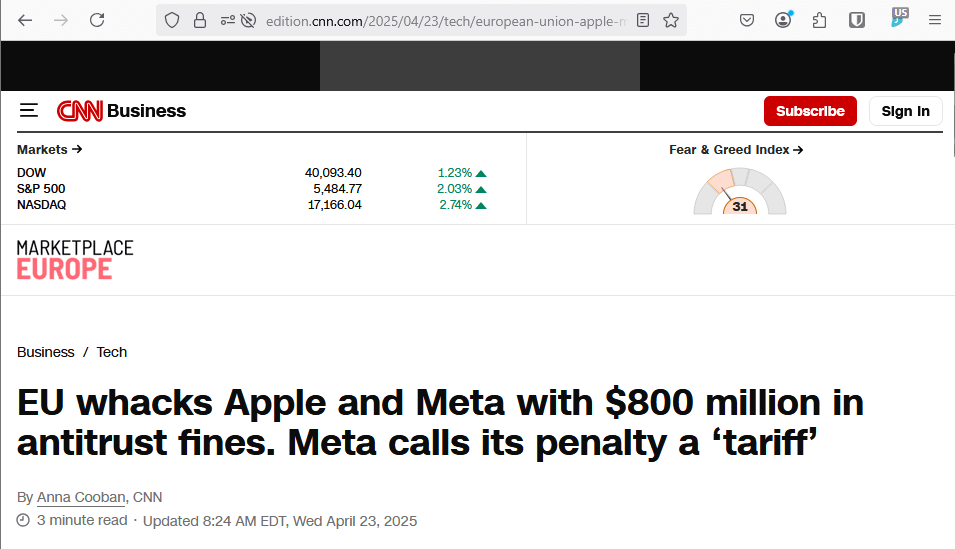
The same page without ads shows much more content.
Understanding the Risks of Ads
Here’s a breakdown of the primary risks associated with allowing ads to load on your devices:
1. Privacy Issues
Most ads come from third-party networks that employ sophisticated tracking tools that compile personal data without your consent. Think of these as undercover surveillance agents—far from just simple promotional material.
2. Security Risks
Malvertising is a fundamental threat. Even if you don’t interact with ads, malicious codes hidden within can compromise your systems, leading to severe issues like ransomware attacks, which lock you out of your data until you meet demands.

3. Poor Performance
Ads significantly drain resources, especially on mobile devices. Past studies show that ads can consume over 75% of mobile bandwidth and halve your data allowance, leading to slower browsing and shorter battery life.
Ad Blockers to the Rescue
With an understanding of the risks, what steps can you take to diminish them? Ad blockers are a solid first line of defense against these issues.
Types of Ad Blockers
Browser Ad Blocker Extensions:
- uBlock Origin: An open-source tool that is lightweight and effective against ads, trackers, and pop-ups. It exists on most major browsers, excluding mobile (best option is Firefox).
- Privacy Badger: Created by the Electronic Frontier Foundation, it restricts trackers that fail to respect privacy.
VPN Ad Blockers:
- NordVPN Threat Protection: With integrated ad blocking, this option works without needing a VPN connection, filtering out annoying advertisements effectively.
- Surfshark CleanWeb: A reliable option that blocks ads while also securing your connection.
Ad-Blocking Browsers:
- Brave: Comes with built-in ad and tracker blocking features for a smooth browsing experience.
- Mozilla Firefox: Offers Enhanced Tracking Protection options to manage ad visibility actively.
Ad Blocker Apps and Router Solutions:
- AdGuard: Works at the device level, blocking ads across all apps, not just browsers.
- Router-based Solutions: Blocking ads at the router level protects every device connected, providing systemic coverage.
Conclusion
While each type of ad blocker has its unique advantages, the best choice ultimately depends on your specific needs and circumstances. Whether integrating browser extensions, employing a VPN, or using dedicated applications, protecting your online experience from intrusive ads is more vital than ever. Make an informed choice to enjoy a clutter-free, secure browsing experience.